How to Create an SDS for Your Amazon Listing
If Amazon has flagged or suppressed your listing for a missing Safety Data Sheet, you're not alone. Thousands of sellers — especially those selling soaps, candles, essential oils, cleaning products, and cosmetics — run into this every day. Here's everything you need to know to get compliant fast.
Free Preview · no account needed
See the draft SDS for your product's chemical
Type the chemical in your product — a CAS number or a name — and Sections 1, 2 and 9 of the draft render here in seconds. Nothing to pay, no account. Acetone stands in as the example until you do.
Free · no account · no payment · Sections 1, 2 and 9 of the draft
Acetone
CAS: 67-64-1 · C₃H₆O
GHS Rev. 7 · OSHA 29 CFR 1910.1200
Draft SDS — Sections 1, 2 and 9 Preview
Written against GHS Rev. 7 and OSHA 29 CFR 1910.1200 · for review before use
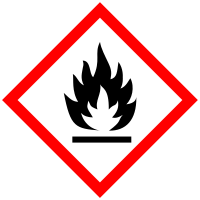
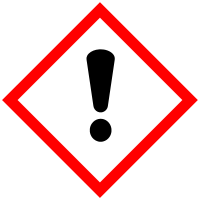 DANGER
GHS classification:
- Flammable Liquid, Category 2 (H225)
- Eye Irritation, Category 2A (H319)
- Specific Target Organ Toxicity (Single Exposure), Category 3 — CNS (H336)
Hazard statements:
Sections 3 to 16 are included in the full draft document.
Generated by ChemEngine Datatools
Draft Preview · not for regulatory use without review
This draft Preview covers Sections 1, 2 and 9. For $5 you get both the 16-section draft SDS and a matching draft GHS Label. Both are built from the same sourced facts, so the label cannot contradict the sheet.
Editable .docx draft · white-labeled · no account required · delivered in 60 seconds.
Money back if the draft is not usable.
Email this draft Preview to yourself (optional)
What Is a Safety Data Sheet (SDS)?
A Safety Data Sheet — commonly called an SDS — is a standardized document that describes the hazards, handling procedures, and safety precautions for a chemical product. Think of it as a product's safety resume. It tells anyone who handles the product — warehouse workers, shipping carriers, emergency responders — exactly what they need to know.
SDS documents follow the Globally Harmonized System (GHS)format, which means they have a standardized structure with 16 specific sections. This isn't optional — it's required by OSHA in the United States and by regulatory agencies worldwide.
If you manufacture, distribute, or sell any product that contains chemicals — even common ones like essential oils or surfactants — you are legally required to have an SDS available.
Why Amazon Requires a Safety Data Sheet for Your Listing
Amazon operates massive fulfillment centers where products are stored, handled, and shipped by workers every day. When you send products to FBA (Fulfillment by Amazon), Amazon becomes responsible for safe storage and handling. They need SDS documents to protect their workers and comply with OSHA regulations.
Amazon's automated system scans your product listing for keywords that indicate a chemical product. Words like "organic," "natural," "essential oil," "antibacterial," "fragrance," or even "scented" can trigger a hazmat review. When this happens, Amazon suppresses your listing and asks you to upload an SDS.
Products commonly flagged by Amazon:
- Candles & wax melts
- Soaps & bath bombs
- Essential oils
- Cleaning products
- Cosmetics & skincare
- Batteries & electronics
- Nail polish & adhesives
- Perfumes & fragrances
The bottom line: if your product contains any chemical ingredient, Amazon will likely require an SDS before allowing your listing to go live or remain active.
How the Amazon Hazmat Review Process Works
When Amazon's system flags your product, here's what happens:
- 1Listing suppressed.Your product disappears from search results. If you already have inventory at FBA, it becomes "stranded" — Amazon holds it but won't ship it to customers.
- 2Document request.You'll receive a notification in Seller Central asking you to upload compliance documents — specifically an SDS and sometimes an exemption sheet.
- 3Review period.After you upload, Amazon's hazmat team reviews the SDS. This typically takes 1–3 business days. If the SDS is properly formatted and complete, your listing is reactivated.
- 4Classification. Based on the SDS, Amazon classifies your product as either non-hazardous (standard shipping) or hazardous (restricted handling). Most consumer products like soaps and candles are classified as non-hazardous.
ChemEngine Datatools
Amazon Listing Flagged? Get Your SDS Now
Generate a GHS-compliant, white-labeled SDS for your Amazon listing in minutes. No chemistry degree required.
Get your SDS — $5The 16 Sections of a GHS-Compliant SDS
Amazon expects your SDS to follow the GHS format with all 16 sections. Here's what each section covers:
Product name, your company name, address, phone number, and recommended uses.
GHS classification, signal words, hazard statements, and pictograms.
Chemical name, CAS numbers, and concentration ranges for each ingredient.
What to do if someone is exposed — inhalation, skin contact, eye contact, or ingestion.
Suitable extinguishing media and special hazards from the product.
How to clean up spills and prevent environmental contamination.
Precautions for safe handling and conditions for safe storage.
Occupational exposure limits and recommended protective equipment.
Appearance, odor, pH, flash point, boiling point, and other measurable properties.
Chemical stability and conditions to avoid.
Health effects from short-term and long-term exposure.
Environmental impact, aquatic toxicity, and biodegradability.
Safe disposal methods and regulatory requirements.
UN number, shipping name, and transport hazard class.
Applicable safety, health, and environmental regulations.
Date of preparation, revision dates, and any additional notes.
How to Get an SDS for Your Amazon Listing — Fast
Traditionally, creating an SDS meant hiring a regulatory consultant — a process that can take weeks and cost hundreds of dollars per document. For small Amazon sellers, that's not practical when you need to get your listing back up today.
ChemEngine Datatools uses AI to generate GHS-compliant draft SDS documents in minutes. Here's how it works:
Enter your chemical identifier
Provide a CAS number, chemical name, or formula. For multi-ingredient products, use the primary active ingredient.
Add your company website
We automatically pull your logo and company details to white-label the SDS. Your brand appears in Section 1 as the responsible party.
Pay $5 and receive your SDS
Secure checkout via Stripe. Your GHS-compliant draft SDS is delivered to your email as an editable Word document (.docx) — customize it, remove the draft watermark, and export to PDF for Seller Central.
How to Upload Your SDS to Amazon Seller Central
Once you have your SDS, uploading it to Amazon is straightforward:
- Log in to Seller Central and go to Inventory > Manage All Inventory.
- Find your suppressed ASIN and click "Edit" or look for a compliance notification.
- Navigate to "Compliance" or "Safety & Compliance" in the listing editor.
- Export your editable Word document (.docx) to PDF, then upload it where prompted for "Safety Data Sheet."
- Submit and wait for Amazon's hazmat team to review (usually 1–3 business days).
If your SDS is properly formatted with all 16 GHS sections, your listing should be reactivated after review. In some cases Amazon may request an exemption sheet as well — this is a separate one-page form confirming your product's hazard classification.
Common Mistakes That Get Your SDS Rejected by Amazon
- Using an MSDS instead of an SDS. The old MSDS format is no longer accepted. Amazon requires the modern GHS-aligned SDS with 16 sections.
- Missing or incomplete sections. All 16 sections must be present, even if some state "not applicable." Amazon's review team checks for completeness.
- Wrong company listed in Section 1. If you're the brand owner, Section 1 should show your company — not your supplier's.
- Product name mismatch. The product name on the SDS should match (or closely relate to) the product in your Amazon listing.
- Non-English SDS for US marketplace. If you sell on Amazon.com, the SDS must be in English.
ChemEngine Datatools
Need a safety data sheet or GHS label?
Get a draft SDS, GHS label, or the bundle for $5. No account required, delivered in 60 seconds.
Get draft SDS — $5